Creative AI vs Traditional Design Tools: Measuring Productivity Gains in Adobe’s Latest Platform Updates


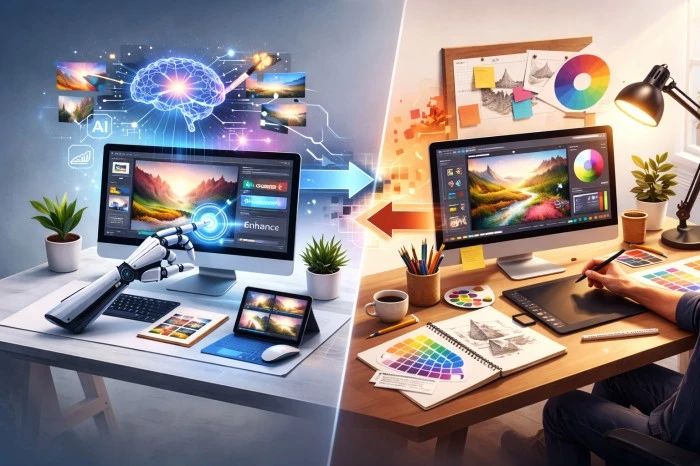
The creative landscape is rapidly evolving. Traditional design tools — once indispensable for graphic designers, video editors, and visual storytellers — are now being challenged by a new wave of capabilities powered by artificial intelligence. At the forefront of this shift is Adobe, whose latest platform updates integrate Creative AI deeply into everyday workflows. But what does this mean in practical terms for productivity? Is Creative AI simply a buzzword, or does it deliver measurable gains over conventional design tools? Examining real-world impacts reveals that AI innovation isn’t just transforming how creatives work — it’s fundamentally changing what’s possible.
Understanding the Landscape: Traditional Tools vs. Creative AI
Traditional design software has long been the foundation of professional content creation. Tools like vector editors, pixel-based graphics programs, and timeline-based video suites require mastery of technical skills and significant time investment. Designers typically build from scratch, manually adjusting layers, masks, effects, and compositions. While these tools offer unparalleled precision and creative depth, they also demand repetitive manual effort, especially when scaling work across multiple formats or audiences.
Creative AI challenges this paradigm by introducing intelligent automation and generative capabilities. Rather than starting from a blank canvas, designers can now generate initial concepts, automate repetitive tasks, and receive context-aware suggestions based on content goals. In Adobe’s latest platform updates, Creative AI tools are embedded directly into core apps, enabling a hybrid workflow where human creativity and machine intelligence work in tandem.
Productivity Gains Through Ideation and Concept Development
One of the most immediate impacts of Creative AI is in the ideation phase. Traditional workflows often begin with mood boards, sketches, and brainstorming. These activities can be time-consuming and sometimes subjective.
By contrast, Creative AI accelerates early stages by generating visual concepts based on natural-language prompts, imported brand assets, or performance data. Instead of spending hours sketching layout variations or color treatments, designers can preview multiple directions in minutes. This rapid concept generation not only speeds up decision-making but also helps teams converge on ideas that align with strategy and audience preferences.
In Adobe’s updated platform, AI-powered ideation tools can suggest multiple design frameworks, style variations, and even copy elements — saving teams days of preliminary work and reducing creative friction between stakeholders.
Automating Repetitive Tasks Without Sacrificing Control
Traditional design tools excel in precision but often fall short when scaling repetitive tasks. Resizing assets, adapting layouts for multiple platforms, and replicating design patterns across a suite of deliverables consumes significant time — especially in modern omnichannel environments.
Creative AI assists by recognizing patterns in existing designs and applying them intelligently across new assets. For example, rather than manually reformatting a social graphic for various aspect ratios, an AI tool can automatically adapt layouts while maintaining visual balance and brand integrity. Similarly, AI can isolate subjects, mask complex backgrounds, or generate multiple stylistic variants with minimal user intervention.
These capabilities allow designers to focus on higher-order decisions rather than rote execution. Instead of spending hours on formatting and scaling, creative professionals can dedicate more time to refining messaging, strategy, and aesthetics.
Intelligent Editing and Quality Assurance
Editing and refinement are essential but time-intensive components of design work. Traditionally, editors make countless adjustments to colors, contrast, typography, and alignment. Quality checks often involve manual comparison and review cycles.
Creative AI adds another efficiency layer by performing context-aware enhancements and suggesting edits based on platform standards and best practices. This can lead to measurable reductions in time spent on revision cycles. For example, AI-assisted color correction or layout alignment tools can make precise edits in seconds, whereas manual adjustments might have taken much longer.
Moreover, AI-driven quality assurance tools can flag inconsistencies or accessibility issues before assets are finalized — enhancing both speed and reliability in production workflows.
Measuring Real Productivity Gains
Beyond anecdotal feedback, measurable productivity gains have emerged as organizations adopt Creative AI. Early adopters report significant reductions in production timelines and improved capacity for parallel workflows.
In practical terms, teams using Creative AI report:
- Faster turnaround times: By automating repetitive tasks, teams shorten project timelines without increasing staffing levels.
- Higher output volume: Automation enables teams to produce more deliverables within the same time frame.
- Enhanced creative focus: Designers spend more time on ideation, strategy, and refinement — tasks that add strategic value rather than manual execution.
While individual results vary based on project type and team structure, the overall trend is clear: Creative AI hasn’t replaced traditional tools but has elevated them — enabling a more efficient, creative, and scalable workflow.
A Collaborative Future, Not a Replacement
Important to note is that Creative AI doesn’t render traditional design tools obsolete. Instead, it augments them. The most successful workflows blend human intuition, artistic judgment, and strategic insight with AI-powered efficiency. Adobe’s latest updates reflect this philosophy — integrating AI seamlessly into familiar tools so creators can benefit without a steep learning curve.
In the long run, Creative AI represents an evolution of design practice: empowering creators to do more with less time, reduce operational overhead, and unlock new forms of creativity that were previously impractical due to resource constraints.
Final Thoughts
The debate between Creative AI and traditional design tools isn’t an either-or scenario. Rather, it highlights a shift in how creative work is executed. Adobe’s latest platform updates demonstrate that AI can be a force multiplier, enhancing productivity across ideation, creation, editing, and quality assurance. For U.S. creative teams in advertising, digital media, and content production, the future is already here — a hybrid landscape where ingenuity and automation work together to deliver faster, smarter, and more impactful results.